
The Reverse Beacon Network is a global array of software-defined radio receivers called “skimmers” that continuously scan the HF bands and report every CW, RTTY, and FT8 signal they hear. Unlike a traditional spotting network driven by human operators, the RBN runs 24/7 and produces thousands of automated spots per hour.
That firehose of data contains something tremendously useful: a real-time picture of which paths on which bands are actually carrying RF right now. The RBN S-Meter extracts exactly that picture and presents it in a form your eyes can parse in seconds.
The RBN S-Meter is now a free web app that runs on any device. Visit it at https://rbsm.rm.gl
Your Vantage Point
The core concept of the RBN S-Meter is your vantage point. The app filters RBN spots to only those heard by skimmers near you, then shows signal levels from each DX region of the world as seen from your location. The result is a real-time picture of which paths are open, on which bands, at what strength.
You have two ways to set your vantage point, selected by the radio buttons at the top of the app.
Region Mode
The simplest option. Use the Region dropdown to pick the broad geographic area closest to you: E. North America, C. North America, W. North America, South America, Europe, Africa, Asia, or Oceania. The app will use all RBN skimmers in that region as your listening posts.
Region mode is a good starting point, but a large region can include skimmers that are far from you with very different propagation characteristics. A station in Calgary and a station in Florida are both in “E/C North America” but they hear the world quite differently.
Grid Square Mode
For a more accurate picture, switch to Grid mode. Enter your Maidenhead grid square (4 or 6 characters, for example FN42) and choose a radius from the dropdown. The app will then only count spots from RBN skimmers that fall within that radius of your grid square centre.
The radius dropdown gives you five options: 250, 500, 1000, 1500, and 2000 miles. Choosing a tighter radius means fewer skimmers contribute to the data, so you get a more local picture but with less data to average. If you pick a radius that is too small and there are no skimmers nearby, the panels will show no data. Start at 500 miles and adjust from there.
If you do not know your grid square, sites like QRZ.com show it on your callsign page, or you can look it up at levinecentral.com. (The app will get your grid square for you if your on a device with a GPS).
What You See
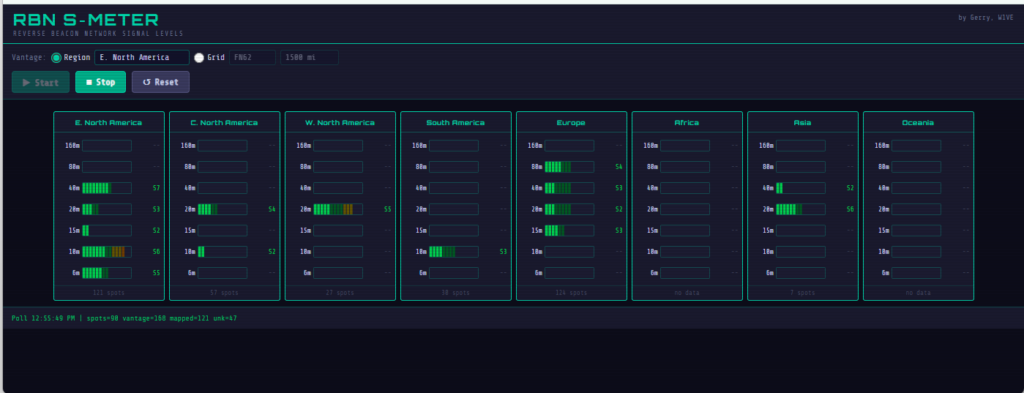
The app shows eight region panels side by side: E. North America, C. North America, W. North America, South America, Europe, Africa, Asia, and Oceania. Each panel contains one horizontal bar per band, covering 160m through 6m.
The bar fills left to right as signal strength increases, with a colour ramp from green through yellow, orange, and red at the top end. A dimmer trail shows the peak hold value since the last reset. To the right of each bar is an S-unit readout. At the bottom of each panel is a spot count showing how many RBN reports are backing the current reading. S7 on 25 spots is a solid number. S7 on 2 spots should be taken with more caution.
The status bar at the bottom of the screen updates after every poll, showing the timestamp, total spots received, how many came from your vantage area, how many were mapped to a region, and how many were unclassified.
A Practical Example
Say it is late afternoon and you want to work some EU. You open the RBN S-Meter and see Europe showing 40m at S5 with 28 spots, 20m at S3 with 9 spots, and 15m dark. That tells you 40m is your best bet right now, 20m is marginal, and 15m is not worth your time. You tune to 40m, find a pile-up, and work it. No guesswork, no time wasted spinning the dial on a dead band.
Or flip it around: you want to know if 10m is open to Japan. Look at the Asia panel and check the 10m bar. Either it is lit up or it is not. The RBN does not lie.
On Mobile: The Accordion View
On a phone screen, the eight panels cannot all fit side by side. The app automatically switches to an accordion layout when it detects a phone-sized screen.
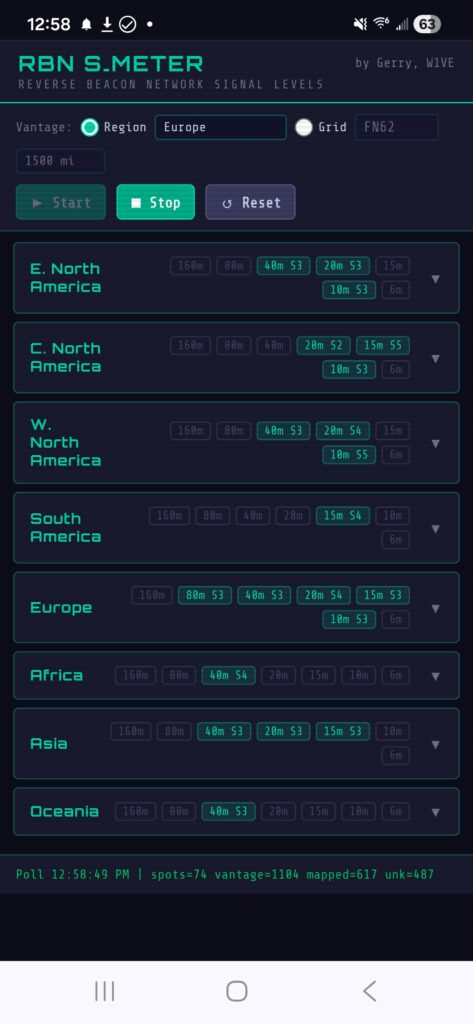
Each region appears as a row showing the region name and a summary of the best band readings at a glance. Tap any row to expand it to a full band-by-band view for that region.
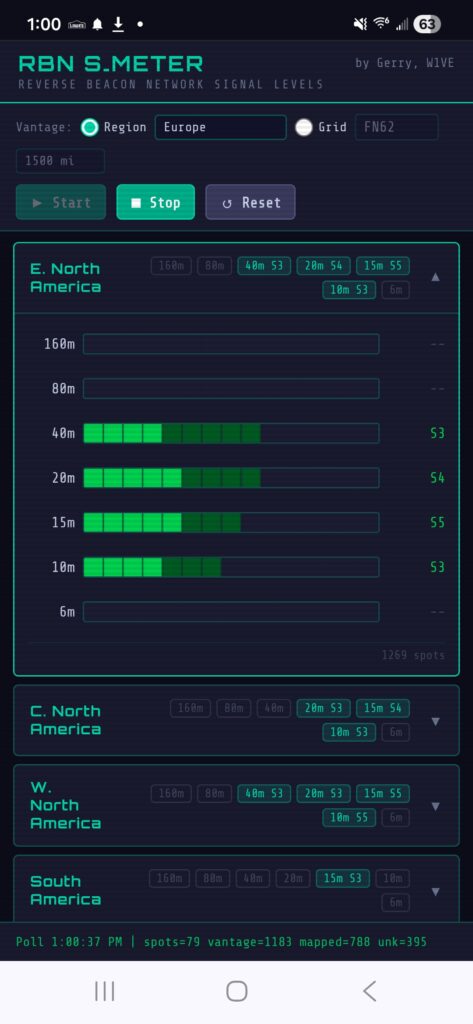
The controls at the top work the same way as on desktop. The Vantage row lets you switch between Region and Grid mode, enter your grid square, and set your radius. On a phone these controls wrap to fit the narrower screen. The Start, Stop, and Reset buttons are below the controls.
On Desktop and Tablet
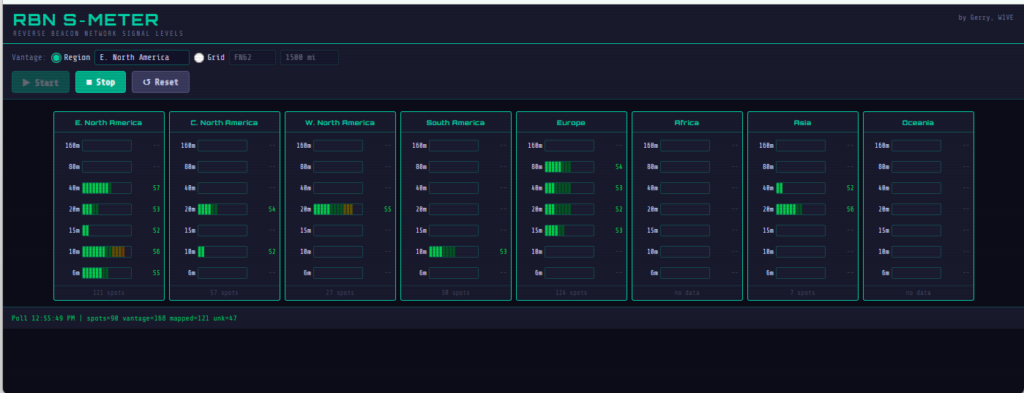
On a tablet or desktop browser the app shows all eight region panels side by side, matching the look of the original Windows application. If all panels do not fit the screen width, you can scroll horizontally to see the rest.
Installing the App
The RBN S-Meter is a Progressive Web App, which means it can be installed on your device and launched from your home screen or desktop just like a native app. It works entirely in the browser with no download required, but installing it gives you a proper icon, a full-screen experience, and faster launch times.
Android (recommended browser: Chrome)
- Open https://rbsm.rm.gl in Chrome.
- Tap the three-dot menu in the top right corner.
- Tap Add to Home screen or Install app.
- Tap Add.
The app will appear on your home screen with the S-Meter icon. Launch it from there and it opens full screen with no browser chrome.
[Screenshot: Android install prompt or home screen icon]
iPhone and iPad (Safari only)
Apple only allows PWA installation through Safari. Chrome, Firefox, and other browsers on iOS cannot install web apps, so you must use Safari for this step.
- Open https://rbsm.rm.gl in Safari.
- Tap the Share button at the bottom of the screen (the box with an arrow pointing up).
- Scroll down and tap Add to Home Screen.
- Tap Add in the top right.
[Screenshot: iPhone Add to Home Screen prompt]
Windows Desktop (recommended browser: Edge or Chrome)
In Microsoft Edge:
- Open https://rbsm.rm.gl in Edge.
- Look for the install icon in the address bar (a plus sign in a box) on the right side.
- Click it and then click Install.
Alternatively: three-dot menu, then Apps, then Install this site as an app.
In Google Chrome:
- Open https://rbsm.rm.gl in Chrome.
- Look for the install icon (a computer with a down arrow) in the address bar.
- Click it and then click Install.
Once installed on Windows, the app appears in the Start menu and can be pinned to the taskbar. It opens in its own borderless window that looks and feels like a native application. Firefox on Windows does not support PWA installation.
Edge gives the best PWA experience on Windows and is the recommended choice. The installed app even appears in Add/Remove Programs and can be managed like any other application.
[Screenshot: RBN S-Meter installed as Windows desktop app]
A Note to Windows Application Users
A big thank you to everyone who downloaded and tested the original standalone Windows executable and took the time to send feedback. Your reports about the SQLite error, the region granularity issue, and the grid square request shaped the development of the app significantly and are greatly appreciated.
The standalone Windows .exe has been retired. The web app at https://rbsm.rm.gl replaces it entirely, runs on every platform, requires no installation, and includes all the improvements that came out of your feedback including grid square mode, adjustable radius, and automatic location detection. Please point your bookmarks there going forward.
73 de W1VE — comments and bug reports always welcome.

18 thoughts to “An RBN S-Meter…”
Looks good Gerry. My comments are the following regarding relying on RBN to see if bands are open or not.
I have often found many of the RBN nodes taken down during contests while owners are participating that weekend. Many of these have excellent receive antennas that provide excellent SNRs when the band is open when the node is active. . This means that some areas may not have a working RBN that usually provides feedback leading to a false belief that conditions aren’t good to that particular area. This brings me to my second point about relying on RBN reports only. There’s a huge variety of antennas being used to receive signals at RBN nodes. Some are just wires. Some are verticals. Some are Beverages favoring one direction of another, etc.. So a low RBN SNR doesn’t necessarily mean the band is poor. Two recent examples . CQing on 10 meters yielded no RBN hits in Europe yet a station in Sardinia called me that was S9. There have also been numerous times where I’ve CQed on 160 meters and had zero RBN hits in Europe yet I was called by numerous strong signaled Europeans on TopBand after CQing a few times. SNR levels depend on the signal strength received as well as the QRN/QRM being received on or near the received signal frequency at that RBN location. The SNR can be showing as 3DB but my signal can actually be S9+. RBN is a great tool but it’s not always telling the truth. SNR and actual signal strength are different. Having said this I still want to try the “SNR” meter App as it definitely looks like an easier way to monitor RBN SNRs at a glance. Maybe it should be called RBN “SNR Meter”.
Thanks, Ken. Your comments greatly appreciated.
Looks quite useful although I don’t think there are more than a few skimmers that relate to my geographic location in Calgary. Western, and Central NA usually have very different propagation due mainly to latitude and magnetic declination.
The app is updated, Jerry. You can specify a grid square and a radius. So you can zoom in on the skimmers.
Gerry, this is a great idea! I downloaded the exe but it won’t run on my computer – getting an error that says: Unhandled exception has occured. The initializer for Microsoft.Data.SqliteConnection threw an exception.
Hi Gene — I have updated the app and it should be bulletproof now. Just delete what you have, re-download and try again.
Garry thank you for this. The names of the Band regions (160, 80, etc.) by continent are unclear. Could the issue be because I’m using a different “Country or region” settings whitin Windows 10 64? I’m also getting the following error:
See the end of this message for details on invoking
just-in-time (JIT) debugging instead of this dialog box.
************** Exception Text **************
System.TypeInitializationException: The type initializer for ‘Microsoft.Data.Sqlite.SqliteConnection’ threw an exception.
—> System.Reflection.TargetInvocationException: Exception has been thrown by the target of an invocation.
—> System.DllNotFoundException: Dll was not found.
at SQLitePCL.SQLite3Provider_e_sqlite3.SQLitePCL.ISQLite3Provider.sqlite3_libversion_number()
at SQLitePCL.raw.SetProvider(ISQLite3Provider imp)
at System.RuntimeMethodHandle.InvokeMethod(Object target, Void** arguments, Signature sig, Boolean isConstructor)
at System.Reflection.MethodBaseInvoker.InvokeWithNoArgs(Object obj, BindingFlags invokeAttr)
— End of inner exception stack trace —
at System.Reflection.MethodBaseInvoker.InvokeWithNoArgs(Object obj, BindingFlags invokeAttr)
at System.Reflection.RuntimeMethodInfo.Invoke(Object obj, BindingFlags invokeAttr, Binder binder, Object[] parameters, CultureInfo culture)
at Microsoft.Data.Sqlite.SqliteConnection..cctor()
— End of inner exception stack trace —
at Microsoft.Data.Sqlite.SqliteConnection..ctor(String connectionString)
at RbnSMeter.SpotterCache.OpenAndInit()
at RbnSMeter.SpotterCache..ctor()
at RbnSMeter.RbnPoller..ctor(Dictionary`2 meters)
at RbnSMeter.MainForm.StartPolling()
at System.Windows.Forms.Button.OnClick(EventArgs e)
at System.Windows.Forms.Button.OnMouseUp(MouseEventArgs mevent)
at System.Windows.Forms.Control.WmMouseUp(Message& m, MouseButtons button, Int32 clicks)
at System.Windows.Forms.Control.WndProc(Message& m)
at System.Windows.Forms.ButtonBase.WndProc(Message& m)
at System.Windows.Forms.NativeWindow.Callback(HWND hWnd, MessageId msg, WPARAM wparam, LPARAM lparam)
************** Loaded Assemblies **************
System.Private.CoreLib
Assembly Version: 9.0.0.0
Location:
—————————————-
RbnSMeter
Assembly Version: 1.0.0.0
Location:
—————————————-
System.Runtime
Assembly Version: 9.0.0.0
Location:
—————————————-
System.Windows.Forms
Assembly Version: 9.0.0.0
Location:
—————————————-
System.ComponentModel.Primitives
Assembly Version: 9.0.0.0
Location:
—————————————-
System.Windows.Forms.Primitives
Assembly Version: 9.0.0.0
Location:
—————————————-
System.Private.Windows.Core
Assembly Version: 9.0.0.0
Location:
—————————————-
System.Drawing.Primitives
Assembly Version: 9.0.0.0
Location:
—————————————-
System.Collections.Specialized
Assembly Version: 9.0.0.0
Location:
—————————————-
System.Runtime.InteropServices
Assembly Version: 9.0.0.0
Location:
—————————————-
System.Threading
Assembly Version: 9.0.0.0
Location:
—————————————-
System.Drawing.Common
Assembly Version: 9.0.0.0
Location:
—————————————-
System.ComponentModel.EventBasedAsync
Assembly Version: 9.0.0.0
Location:
—————————————-
Accessibility
Assembly Version: 4.0.0.0
Location:
—————————————-
System.ComponentModel.TypeConverter
Assembly Version: 9.0.0.0
Location:
—————————————-
System.ComponentModel
Assembly Version: 9.0.0.0
Location:
—————————————-
Microsoft.Win32.SystemEvents
Assembly Version: 9.0.0.0
Location:
—————————————-
System.Threading.Thread
Assembly Version: 9.0.0.0
Location:
—————————————-
System.Text.Json
Assembly Version: 9.0.0.0
Location:
—————————————-
System.Text.Encodings.Web
Assembly Version: 9.0.0.0
Location:
—————————————-
System.Runtime.Intrinsics
Assembly Version: 9.0.0.0
Location:
—————————————-
System.Collections.Concurrent
Assembly Version: 9.0.0.0
Location:
—————————————-
System.Private.Uri
Assembly Version: 9.0.0.0
Location:
—————————————-
System.Reflection.Emit.Lightweight
Assembly Version: 9.0.0.0
Location:
—————————————-
System.Collections
Assembly Version: 9.0.0.0
Location:
—————————————-
System.Memory
Assembly Version: 9.0.0.0
Location:
—————————————-
System.IO.Pipelines
Assembly Version: 9.0.0.0
Location:
—————————————-
System.Collections.NonGeneric
Assembly Version: 9.0.0.0
Location:
—————————————-
System.Text.RegularExpressions
Assembly Version: 9.0.0.0
Location:
—————————————-
System.Net.Http
Assembly Version: 9.0.0.0
Location:
—————————————-
System.Net.Primitives
Assembly Version: 9.0.0.0
Location:
—————————————-
System.Diagnostics.Tracing
Assembly Version: 9.0.0.0
Location:
—————————————-
System.Diagnostics.DiagnosticSource
Assembly Version: 9.0.0.0
Location:
—————————————-
System.Net.Security
Assembly Version: 9.0.0.0
Location:
—————————————-
System.Security.Cryptography
Assembly Version: 9.0.0.0
Location:
—————————————-
Microsoft.Win32.Registry
Assembly Version: 9.0.0.0
Location:
—————————————-
System.Net.Sockets
Assembly Version: 9.0.0.0
Location:
—————————————-
Microsoft.Win32.Primitives
Assembly Version: 9.0.0.0
Location:
—————————————-
System.Threading.Overlapped
Assembly Version: 9.0.0.0
Location:
—————————————-
System.Numerics.Vectors
Assembly Version: 9.0.0.0
Location:
—————————————-
System.Net.NameResolution
Assembly Version: 9.0.0.0
Location:
—————————————-
System.Threading.ThreadPool
Assembly Version: 9.0.0.0
Location:
—————————————-
Microsoft.Data.Sqlite
Assembly Version: 10.0.6.0
Location:
—————————————-
System.Data.Common
Assembly Version: 9.0.0.0
Location:
—————————————-
SQLitePCLRaw.batteries_v2
Assembly Version: 2.1.11.2622
Location:
—————————————-
netstandard
Assembly Version: 2.1.0.0
Location:
—————————————-
SQLitePCLRaw.provider.e_sqlite3
Assembly Version: 2.1.11.2622
Location:
—————————————-
SQLitePCLRaw.core
Assembly Version: 2.1.11.2622
Location:
—————————————-
System.Runtime.Loader
Assembly Version: 9.0.0.0
Location:
—————————————-
System.Diagnostics.StackTrace
Assembly Version: 9.0.0.0
Location:
—————————————-
System.Reflection.Metadata
Assembly Version: 9.0.0.0
Location:
—————————————-
System.Collections.Immutable
Assembly Version: 9.0.0.0
Location:
—————————————-
************** JIT Debugging **************
Thanks for that! Unfortunately, you cannot test on all PCs, as everybody’s is different. For the technical explanation, it’s a known problem with Microsoft.Data.Sqlite in single-file publish mode. The SQLite native library (e_sqlite3.dll) gets bundled into the exe but can’t be extracted at runtime on some machines, typically because of antivirus blocking temp file extraction or the user running from a restricted path. I have a fix for the desktop version coming. However, I’m almost finished a portable version that works on any device — Mac/PC Desktop, Tablets, and phones. QRX for a bit.
Thanks for the feedback.
73
Gerry
I just posted a link to your app on our club mailing list. The guys have also asked for WARC bands if that’s possible. Personally I prefer the Android app which is always right at my fingertips.
Thank you, Dan
Thoughts: Youre always thinking ahead and outside the box Gerry. Glad U included Solar data so we dont have to look any up.
Future revisions:
Can the continent/area boxes be re-ordered ?
Can we disable a continent/area boxes?
We’re always hunting Africa, Oceania, Asia both for openings but also stations and these continental displays are often empty. Can a setting be created for a box’s display bargraph be change to RED for example ?
Can you add the WARC bands as a toggle?
-‘RR
Hey Charlie!
Lots of what yoy comment on is alreqdy up. Are you color blind, or just want to choose your own colors? I probably wont so that, but color-blind-friendly pallette would be a good change. As you can now see, there arw mode indicators. CW, SSB and FTx are checked if those types of signals were found. There’s also an SSB box, which is a calculated value: we know how much SNR is required to make SSB possible, so if enough, the indicator is lit. For the regions you want to monitor, either make your browser window smaller so it changes to the accordian format, or use a mobile device.
Aporeciate the feedback!
73
Gerry
Hi Gerry,
I just found this app and am having a lot of fun exploring it. Impressive!
One question: What is meant by “A red X means spots are coming in but not on that mode. “?
(if this is not the appropriate place to ask this type of question, please let me know).
-Steve, W7WM
Hi Steve,
The data is sourced from the reverse beacon network and pskreporter. The SNR meter gives you a real time running average of signal levels from your vantage point to the world.
About the CW, RY, DIG and SSB pills: these are designed to tell you if there is band activity on that mode, except for SSB, which cannot be detected by a skimmer. Along the top of eqch pill is another SNR meter, which tells you the SNR of signals in that mode only. RF and propagation care not about mode, so the SSB pill is checked if the SNR is strong enough to support SSB.
Note that the site is in continuous development, and is now at the URL https://hfsignals.live.
73
Gerry W1VE
A brilliant addition to the RBN network. Anyone else getting 503 errors when they load https://rbsm.rm.gl/?
John E, ZL3TIL (Sysop ZL2KS RBN).
Hi John! Sorry for the late reply! Retirement keeping me busy.
Appreciate the kudos! RBN generates a flood of data… Im just trying to do somw visualizations that are fairly compact but expressive.
I started with my rm.gl domain because it is nice qnd short, but hard to remember…. So now it’s hfsignals.live. the rbsm.rm.gl still works, but it is a redirect to hfsignals.live. it took a bit of work to get that going.
If you have not been to the site lately, a ton of improvements and features. If you hold yourvmouse over the mode elements in the snr meter display, it tells you how many skimmers contributed to the data. Of course, you can do the same over the skimmer count, and get the skimmer calls (list UI limited).
73,
Gerry
Great progress on the app development, Garry. Would it make sense to include an optional mode selection (CW, SSB, RY, DIG, ALL) based on user preference?
Thanks, Dan S50U
Gerry
A great great app. I gave a brief presentation to my ham club (LINCOLN HILLS AMATEUR RADIO GROUP) after I had only used the app for a couple of hours. Their questions were: 1) more information on the descrription of the graph axises, 2) ability to reduce the size of the AI portion. 3) What does the speaker icon on the left do? 4) Caught me by surprise that you can voice input a question to the AI, and get it to voice and text out. Could you make the AI box shinkable when its not needed. It takes up so much room it limits the focus area to only three. 5) Perhaps its my monitor, but the font (Roboto?) plugs up a lot, e.g. a G begins of look like an O and 6s fill up. Would another less cool font be more readable? And finally 6) Is there a plan for documentation. As a retired technical writer, I kept looking for online help or a manual. Need help creating one?
Art KI6GYY
Thanks for comments! It is a work in progress… Yes, many changes coming up and ill take all your comments under consideration.